
How to Write a Virtual Coffee Chat Invite People Accept
Your team can offer virtual coffee chats with the best intentions and still get very few replies. A strong virtual coffee chat invite makes the difference. When the note feels personal, clear, and easy to answer, people are far more likely to say yes. That matters if you want cross-team connection to become a habit instead of another ignored calendar experiment.
The good news is you do not need clever copy. You need a short message that respects time, gives context, and makes the next step simple. Below, you will find practical ways to write a better virtual coffee chat invite, plus examples you can use with your own team.
Why a better invite matters
The invite sets the tone
Most people decide how they feel about a meeting before they open the calendar hold. If your invite sounds vague or transactional, they expect an awkward conversation. If it sounds thoughtful and relevant, they expect a useful one. Your virtual coffee chat invite should feel like a real person reaching out, not a program pushing one more task.
Low-pressure messages get more yeses
People are busy. They are more likely to accept when your ask feels light and specific. A short message with a simple reason for the chat removes friction. It also helps the other person understand why you chose them, which makes the invitation feel warmer and more intentional.
Connection programs succeed or fail here
Many connection programs break down at the first message. Matching people is only the start. If the outreach feels forced, the conversation never happens. That is why the quality of your virtual coffee chat invite matters just as much as the matching logic behind it.
What to include in your virtual coffee chat invite
1. A clear reason for reaching out
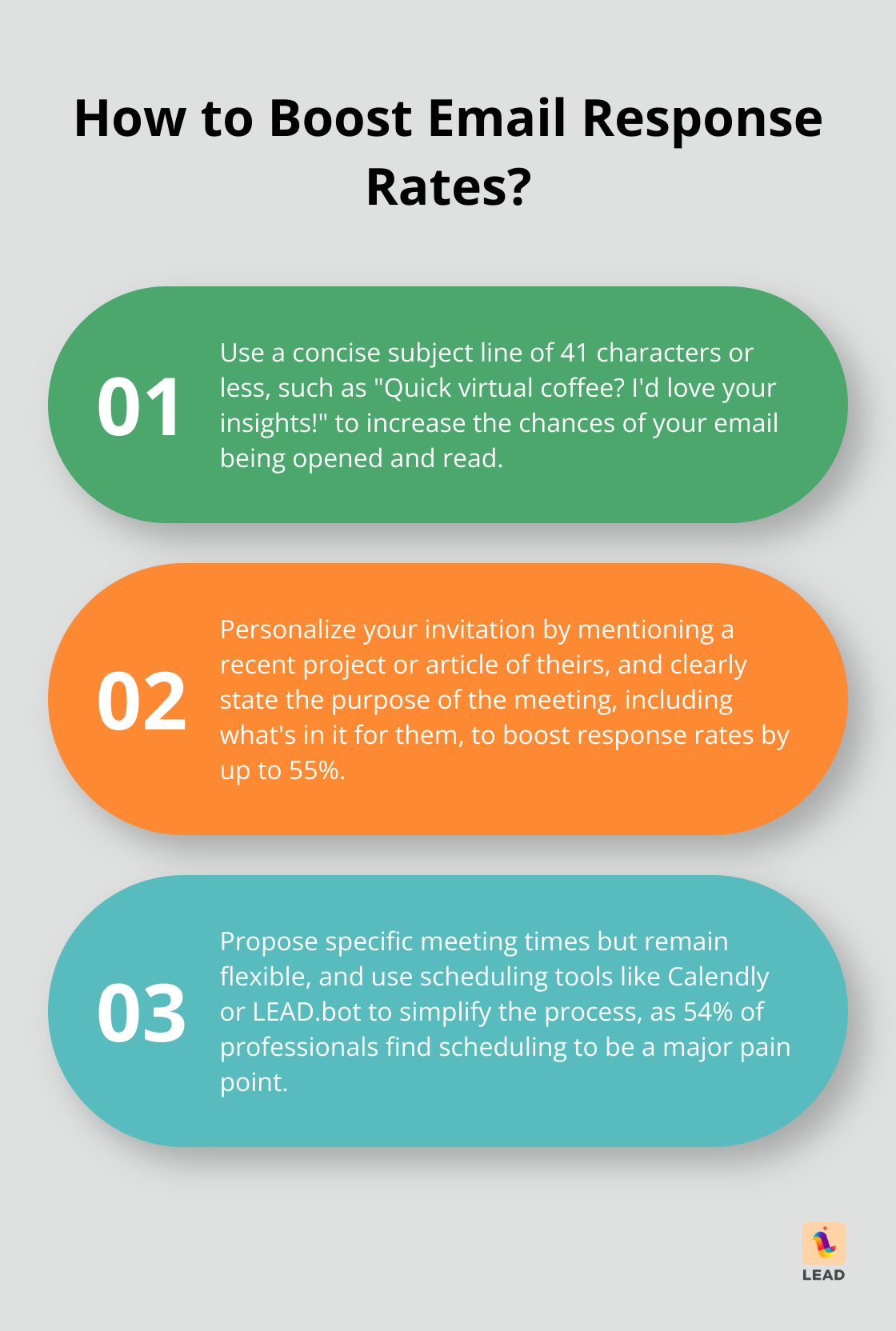
Start with one sentence that explains why you want to meet. Mention a shared project, a team goal, a recent introduction, or a topic the other person knows well. This makes your note feel human instead of random.
Example: “You have worked closely with the customer success team, and I would love to hear what helps those handoffs go smoothly.”
2. A simple time expectation
Say how long the chat will take. Twenty minutes is usually enough. A defined time box makes your invite easier to accept because the other person can picture it fitting into their day.
3. Light context for the conversation
You do not need a formal agenda, but you should give a few lines on what you hope to discuss. That helps people prepare without turning the chat into work. Good topics include role transitions, team norms, customer patterns, or useful people to know across the company.
4. An easy scheduling option
Offer two or three time windows or include a scheduling link. Do not make the other person do extra work to figure out availability. The best virtual coffee chat invite reduces decisions, not adds them.
Examples you can adapt for your team
For a new hire
“Hi Maya, I joined the product team this week and would love to learn more about how your group works with engineering. Would you be open to a 20 minute virtual coffee chat next week?”
For cross-functional collaboration
“Hi Daniel, we have both been involved in onboarding improvements, and I think a quick chat could help me learn from your team’s approach. If you are open, I would love to grab 20 minutes for a virtual coffee chat.”
For peer networking
“Hi Priya, we have not had a chance to meet yet, but we work on adjacent projects. I would enjoy a short virtual coffee chat to compare notes and hear what your team is focused on this quarter.”
Notice what these examples do well. Each one explains why the invite makes sense, keeps the ask small, and gives the other person a reason to respond.

Common mistakes that lower reply rates
Being too generic
A message like “Want to connect sometime?” creates work for the reader. They have to guess the purpose, the timing, and the value. Specificity wins.
Making it sound mandatory
A coffee chat should feel invitational. If the note sounds like a hidden performance task, people will avoid it. Keep the language relaxed and respectful.
Adding too much explanation
Long messages often signal uncertainty. Keep your virtual coffee chat invite short. A few sentences are enough to explain the why, the time, and the next step.
Forgetting the follow-up
If someone does not respond, one gentle follow-up is enough. Wait a few business days, then send a short nudge. After that, let it go.
How LEAD.bot helps these chats happen
Writing the message is only one part of the process. You also need the right introductions. LEAD.bot helps teams create stronger connections by making it easier to match people around real goals, shared context, and useful internal relationships.
If you are building a repeatable connection program, it helps to pair good outreach with better matching. You can explore LEAD.bot features to see how teams support mentoring, onboarding, and team connection. You can also browse more ideas on the LEAD.app blog.

Make the next yes easier
A good virtual coffee chat invite is short, personal, and easy to answer. It gives people enough context to feel comfortable without turning an informal conversation into a formal meeting. When you improve the invite, you improve the odds that the connection actually happens.
If you want more of these conversations across your team, start by making the first message better. Then build a system that helps the right people meet at the right time.