Skip to content

LEAD

  • Products

    Products

    LEAD.bot for Slack & Microsoft Teams

    Circle 2
    Circle 3

    Sunrize App for Slack

    Use Cases

    Knowledge Transferring

    • Inclusive Peer Learning & Mentorship
    • Optimize Workforce Collaboration
    • New Hire Onboarding
    • Virtual Coffee Chat

    Employee Engagement

    • Pulse Survey
    • Birthday and Anniversary Celebration
    • Watercooler

    Knowledge Management

    • Subject Matter Expert Finder

    Solutions

    Streamline your network analysis with our tailored approach. Our experts will work with you to identify the optimal solution that best fits your needs.

    Contact Sales
  • Customer Stories
  • Integrations
  • Pricing
    • LEAD.bot for Teams Pricing
    • LEAD.bot for Slack Pricing
  • Resources
    • Blog
    • Customer Stories
    • Alternatives
  • FAQ
    • FAQ: LEAD.bot for Microsoft Teams
    • FAQ: LEAD.bot for Slack
  • Try LEAD.bot for Free
    Start With Slack
    Start with Teams
Mar52024
Microsoft TeamsSlackHow to Launch LEAD.bot Matching Connect Successfully

1. Program announcement templatesΒ 

2. Set clear expectations for participants like where, when, and how often to expect coffee matching.Β 

To ensure participants have a seamless experience with coffee matching, it’s important to establish clear guidelines, an example could be:

“Get ready for a fun connection moment! Keep an eye on Slack/Microsoft Teams for your next coffee match, popping up every other Friday at 1 PM. With each match, you’ll discover a new colleague to connect with, complete with all the details. Start by saying ‘Hi’ or schedule a quick call right from your message. So, mark your calendars and stay tuned for these exciting bi-weekly networking opportunities!”

3. Make the purpose of meetings clear to participants.

For casual coffee chats, introduce icebreaker topics to encourage engagement. Alternatively, include links to specific resources or subjects for discussion.Β 

4. Use cases with LEAD

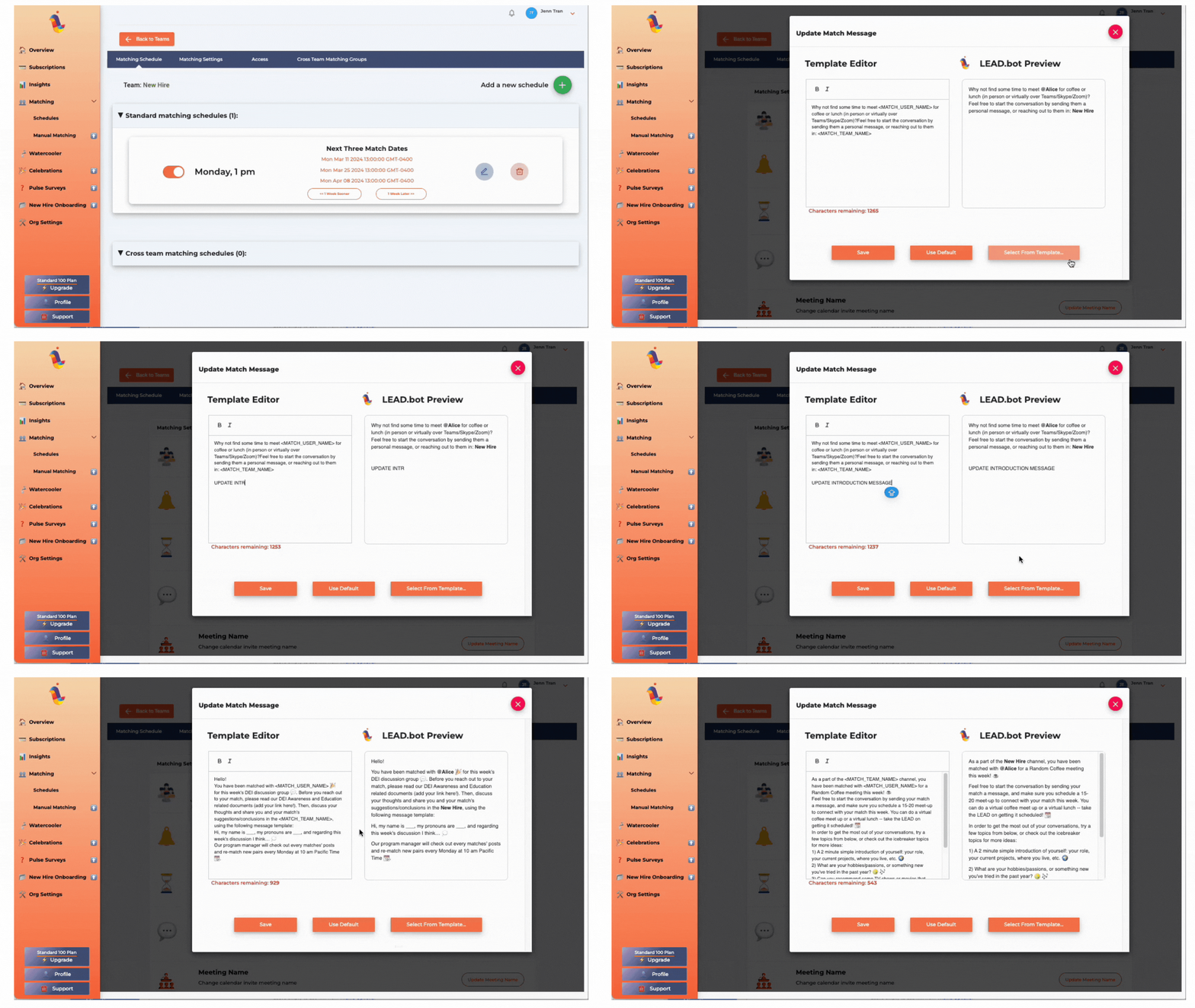
5. Customized Introduction message

Tailor the introductory message to align with your specific initiative by selecting from our pre-made templates. For additional examples and customization options, please visit this link.

6. Tips to Keep Your Team Engaged After Launching

Categories: Microsoft Teams, SlackBy LEAD Editorial TeamMarch 5, 2024

Author: LEAD Editorial Team

Post navigation

PreviousPrevious post:FAQ for LEAD.bot Participants (Standard & Engagement Plan)NextNext post:Program announcement templates

Related Posts

How to Effectively Train and Manage Hybrid Teams
October 3, 2025
Effective-Employee-Check-ins_-Best-Practices
Effective Employee Check-ins: Best Practices
December 10, 2024
Meta Workplace Alternatives - Slack and Microsoft Teams
5 Reasons to Migrate to Slack MS Teams Before Meta
May 22, 2024
Admin FAQs for LEAD.bot
Admin FAQs
March 5, 2024
LEAD.bot Use Cases
LEAD.bot Use Cases
March 5, 2024
Program Announcement Templates for LEAD.bot
Program announcement templates
March 5, 2024

LEAD

hi@lead.app

Facebook-f X-twitter

LEAD.bot

  • Optimize Workforce Collaboration
  • New Hire Onboarding
  • ONA-powered Engagement Survey & Insights
  • Inclusive Peer Learning & Mentorship
  • Birthday & Anniversary Celebration
  • Mentorship Programs for Slack and Teams | LEAD
  • Employee Connection App for Slack and Teams | LEAD
  • New Hire Onboarding Bot for Slack and Teams | LEAD
  • Pulse Survey | Employee Feedback and Team Insight
  • Birthday and Anniversary Bot for Slack and Teams | LEAD
  • Virtual Watercooler | Build Real Team Connections
  • Find Subject Matter Experts Faster | LEAD

Governance & Compliance

  • Terms of Service
  • Privacy Policy
  • Trust at LEAD
  • Terms of service
  • Privacy Policy
  • Trust at LEAD

FAQ

  • LEAD.bot for Microsoft Teams
  • LEAD.bot for Slack
  • LEAD.bot for Microsoft Teams
  • LEAD.bot for Slack

@2025 Lead, Inc.

LEAD.bot employee matching demo

See how LEAD.bot matches employees across teams in Slack and Microsoft Teams.

Add to Slack for Free
Add to Teams for Free
SCHEDULE A DEMO


Request Demo

To learn more or request a demo, feel free to contact us.

[contact-form-7 id=”10″]

The video will automatically play once you fill out this form.

video

[contact-form-7 id=”1364″]