
Skip to content

LEAD

  • Products

    Products

    LEAD.bot for Slack & Microsoft Teams

    Circle 2
    Circle 3

    Sunrize App for Slack

    Use Cases

    Knowledge Transferring

    • Inclusive Peer Learning & Mentorship
    • Optimize Workforce Collaboration
    • New Hire Onboarding
    • Virtual Coffee Chat

    Employee Engagement

    • Pulse Survey
    • Birthday and Anniversary Celebration
    • Watercooler

    Knowledge Management

    • Subject Matter Expert Finder

    Solutions

    Streamline your network analysis with our tailored approach. Our experts will work with you to identify the optimal solution that best fits your needs.

    Contact Sales
  • Customer Stories
  • Integrations
  • Pricing
    • LEAD.bot for Teams Pricing
    • LEAD.bot for Slack Pricing
  • Resources
    • Blog
    • Customer Stories
    • Alternatives
  • FAQ
    • FAQ: LEAD.bot for Microsoft Teams
    • FAQ: LEAD.bot for Slack
  • Try LEAD.bot for Free
    Start With Slack
    Start with Teams
Aug172023
Feature UpdatesMicrosoft TeamsSlackAugust Updates_ LEAD.bot's Data Insights and User Profiles

As August’s sunny days roll in, we’re thrilled to introduce a series of enhancements designed to amplify your LEAD.bot experience. These upgrades offer profound insights, bespoke profiles, and an array of innovative features. Delving into the specifics, you’ll find that these new additions are seamlessly integrated for both Slack and Microsoft Teams versions.

Let’s jump into the details!

πŸ” Program Matching Insights: Unveil Deeper Connections πŸ”

Your connection efforts just got even more rewarding! Admins can now log in to the LEAD.bot dashboard to access valuable insights. Discover who reported successful connections, identify top-performing users and teams, and uncover strategies that foster meaningful interactions.
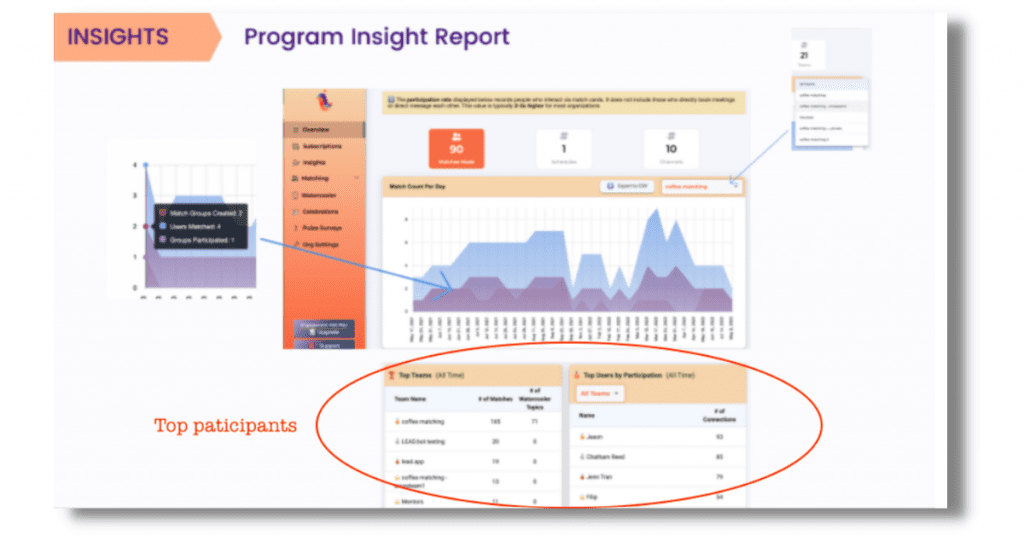
Program Insight Report - LEAD.bot

Armed with this data, admins can recognize and reward outstanding contributors, tailor training programs, or even develop incentives to further encourage meaningful networking within the team.

For a comprehensive view of all participants, instead of just the top performers, and to delve into the reasons and trends behind varying participation behaviorsβ€”including those who’ve never engagedβ€”consider exploring LEAD’s ONA (Organizational Network Analysis) People Analytics Service. To learn more, please reach out for a consultation at cs@lead.app.

πŸ‘₯ Enhanced User Profiles: Embrace Personalization πŸ‘₯

We truly value the essence of personal connections. Now, admins have the freedom to tailor their profiles, including specifics like departments, locations, and even their top picks. And guess what? Participants will soon have the chance to personalize their profiles in our upcoming release! Take a look at the admin profiles, and don’t hesitate to share your thoughts or inquiries. We aim for these revamped profiles to enhance engagements, allowing you to discover colleagues with shared interests and foster deeper ties within your team.

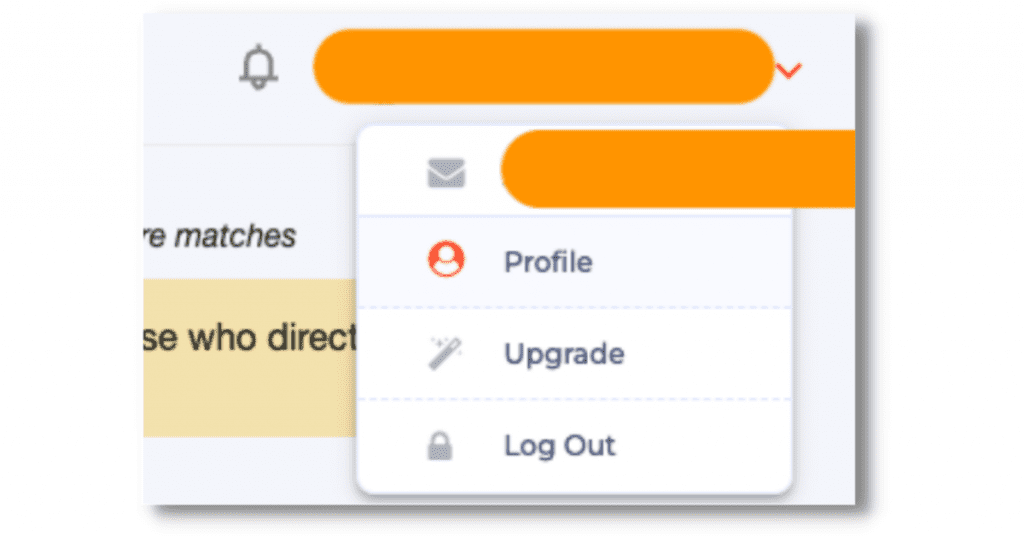
Step 1. Click the icon on the upper right side, and in the drop down menu, click β€œProfile”.

Click Profile - LEAD.bot

Step 2 . Fill out the profile.

Fill out Profile - LEAD.bot

Note: When we launch the participant profile, the end user will be able to access their own profile and participation ranking without accessing the admin dashboard.

πŸŽ‰ Other Exciting New Features You Should Try! πŸŽ‰

LEAD.bot is more than just a virtual coffee app you add into Slack or Microsoft Teams. We’ve introduced new features to assist companies in shaping or evolving their culture. Dive into our latest offerings on the Admin Dashboard, which include:

  • Celebrate Birthdays and Work Anniversaries
  • Gather Insights through Pulse Surveys
  • Elevate the Onboarding Experience with New Hire Onboarding

πŸ“š Recommended Articles to Read & Share πŸ“š

  • “The Best New Hire Onboarding Practices in Microsoft Teams”
  • “Strategic Virtual Coffee Chat Questions for Enhancing Networking (2023)”
  • “Top Questions for Meaningful Networking Coffee Chat”
Categories: Feature Updates, Microsoft Teams, SlackBy LEAD Editorial TeamAugust 17, 2023
Tags: LEAD.bot Feature UpdatesMicrosoft Teams appSlack appteam engagementvirtual coffee appVirtual Coffee ChatVirtual Collaboration

Author: LEAD Editorial Team

Post navigation

PreviousPrevious post:Win the War for Talent with Award-winning LEAD.bot OnboardingNextNext post:(2023) Virtual Communication: Challenges & Best Practices

Related Posts

How to Effectively Train and Manage Hybrid Teams
October 3, 2025
Effective-Employee-Check-ins_-Best-Practices
Effective Employee Check-ins: Best Practices
December 10, 2024
The Remote Work Challenge: Unlocking True Productivity
December 2, 2024
Meta Workplace Alternatives - Slack and Microsoft Teams
5 Reasons to Migrate to Slack MS Teams Before Meta
May 22, 2024
Admin FAQs for LEAD.bot
Admin FAQs
March 5, 2024
LEAD.bot Use Cases
LEAD.bot Use Cases
March 5, 2024

LEAD

hi@lead.app

Facebook-f X-twitter

LEAD.bot

  • Optimize Workforce Collaboration
  • New Hire Onboarding
  • ONA-powered Engagement Survey & Insights
  • Inclusive Peer Learning & Mentorship
  • Birthday & Anniversary Celebration
  • Mentorship Programs for Slack and Teams | LEAD
  • Employee Connection App for Slack and Teams | LEAD
  • New Hire Onboarding Bot for Slack and Teams | LEAD
  • Pulse Survey | Employee Feedback and Team Insight
  • Birthday and Anniversary Bot for Slack and Teams | LEAD
  • Virtual Watercooler | Build Real Team Connections
  • Find Subject Matter Experts Faster | LEAD

Governance & Compliance

  • Terms of Service
  • Privacy Policy
  • Trust at LEAD
  • Terms of service
  • Privacy Policy
  • Trust at LEAD

FAQ

  • LEAD.bot for Microsoft Teams
  • LEAD.bot for Slack
  • LEAD.bot for Microsoft Teams
  • LEAD.bot for Slack

@2025 Lead, Inc.

LEAD.bot employee matching demo

See how LEAD.bot matches employees across teams in Slack and Microsoft Teams.

Add to Slack for Free
Add to Teams for Free
SCHEDULE A DEMO


Request Demo

To learn more or request a demo, feel free to contact us.

[contact-form-7 id=”10″]

The video will automatically play once you fill out this form.

video

[contact-form-7 id=”1364″]